| .github/workflows | ||
| config | ||
| images | ||
| import_event_logs | ||
| logs | ||
| pcap | ||
| test | ||
| clean_logs.sh | ||
| CONTRIBUTING.md | ||
| docker-compose-live.yaml | ||
| docker-compose.yaml | ||
| filebeat.ndjson | ||
| import_event_logs.sh | ||
| LICENSE.txt | ||
| pcapmonkey.yml | ||
| prepare.sh | ||
| README.md | ||

PcapMonkey
Pcapmonkey is a project that will provide an easy way to analyze pcap using the latest version of Suricata and Zeek. It can also save Suricata and Zeek logs in Elasticsearch using the new Elasticsearch Common Schema or the original field names.
Pcapmonkey uses the default docker container for most images and aims to be easy and straightforward to use.
Video tutorial: Startup, Pcap Analysis
PcapMonkey is participating in GSoC 2021 thanks to Honeynet project!
The Honeynet Project

Google Summer Of Code
Since its birth, this project has been participating in the GSoC under the Honeynet Project!
- 2021: Projects available
Stay tuned for the upcoming GSoC! Join the Honeynet Slack chat for more info.
Install & uninstall
Install Docker-CE and docker-compose:
Then just clone this repo to your local machine, and you're ready to go. All the commands listed in this tutorial should be launched from whithin the root folder of this project.
Uninstall
To uninstall and remove all files, delete all containers with
sudo docker-compose down -v
Then you can safely delete this repository.
Basic Usage
To analyze a Packet Capture file, put it to the ./pcap/ and run:
sudo docker-compose up -d elasticsearch filebeat kibana
Then download the Open-ET Rules for suricata.
sudo docker-compose run --entrypoint='suricata-update -f' suricata
Finally, start the Suricata and Zeek containers to analyze the pcap.
sudo docker-compose up suricata zeek
Analyzing Windows Event Logs
Put the .evtx file to be analyzed to import_event_logs/ and start evtxtoelk.
sudo docker-compose up evtxtoelk
Check this wiki for detailed instructions.
Live Traffic Analysis
PcapMonkey now supports live traffic analysis! Check wiki for instructions.
Advanced Usage
Lightweight usage: ditching elasticsearch (the hacker way)
If you prefer using the command line, you can find suricata and zeek logs in the ./logs directory.
If you don't want to waste time starting filebeat/elasticsearch/kibana go to ./zeek/site/local.zeek and comment out the first line (@load policy/tuning/json-logs.zeek). Then start analyzing a new pcap and enjoy plaintext, tab-separated zeek logs. awk all the way, baby!
Even if you'd like to use directly the log file I suggest keeping them in .json format and use jq utility to query them. You can read a pretty good jq primer here
PcapMonkey Architecture
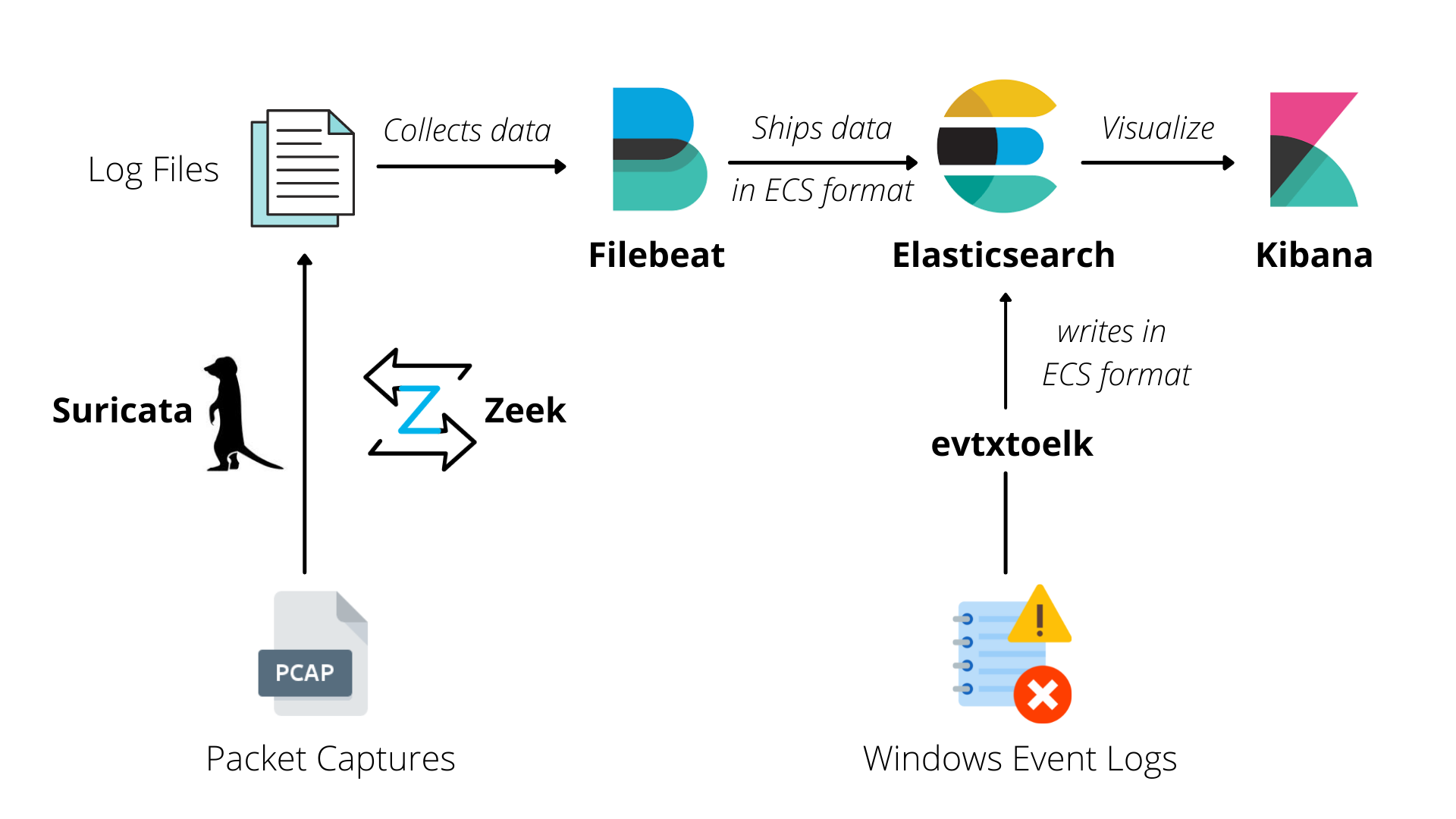
For more information, check PcapMonkey wiki: https://github.com/certego/PcapMonkey/wiki