mirror of
https://github.com/vee1e/PcapMonkey.git
synced 2026-09-01 17:57:29 +00:00

74 lines
No EOL
3.3 KiB
Markdown
74 lines
No EOL
3.3 KiB
Markdown
# PcapMonkey
|
|
Pcapmonkey is a project that will provide an easy way to analyze pcap using the latest version of Suricata and Zeek.
|
|
It can also save Suricata and Zeek logs in Elasticsearch using the new Elasticsearch Common Schema or the original field names.
|
|
|
|
Pcapmonkey uses the default docker container for most images and aims to be easy and straightforward to use.
|
|
|
|
Video tutorial: [Startup](https://www.youtube.com/watch?v=h0bardzCOM4), [Pcap Analysis](https://www.youtube.com/watch?v=zVlFRs2vCQg)
|
|
|
|
## PcapMonkey is participating in GSoC 2021 thanks to Honeynet project!
|
|
### The Honeynet Project
|
|
<a href="https://www.honeynet.org"> <img style="border: 0.2px solid black" width=115 height=150 src="images/honeynet_logo.png" alt="Honeynet.org logo"> </a>
|
|
|
|
### Google Summer Of Code
|
|
|
|
Since its birth, this project has been participating in the GSoC under the Honeynet Project!
|
|
|
|
* 2021: [Projects available](https://www.honeynet.org/gsoc/gsoc-2021/google-summer-of-code-2021-project-ideas/)
|
|
|
|
Stay tuned for the upcoming GSoC! Join the [Honeynet Slack chat](https://gsoc-slack.honeynet.org/) for more info.
|
|
|
|
## Install & uninstall
|
|
Install Docker-CE:
|
|
- https://docs.docker.com/install/linux/docker-ce/ubuntu/
|
|
|
|
Then just clone this repo to your local machine, run `./prepare.sh` and you're ready to go. All the commands listed in this tutorial should be launched from whithin the root folder of this project.
|
|
|
|
## Uninstall
|
|
To uninstall and remove all files, delete all containers with
|
|
```
|
|
sudo docker compose down -v
|
|
```
|
|
Then you can safely delete this repository.
|
|
|
|
## Basic Usage
|
|
To analyze a Packet Capture file, put it to the `./pcap/` and run:
|
|
```bash
|
|
sudo docker compose up -d elasticsearch filebeat kibana
|
|
```
|
|
|
|
Then download the Open-ET Rules for suricata.
|
|
```bash
|
|
sudo docker compose run --entrypoint='suricata-update -f' suricata
|
|
```
|
|
|
|
Finally, start the Suricata and Zeek containers to analyze the pcap.
|
|
```bash
|
|
sudo docker compose up suricata zeek
|
|
```
|
|
|
|
### Analyzing Windows Event Logs
|
|
|
|
Put the `.evtx` file to be analyzed to `import_event_logs/` and start [evtxtoelk](https://github.com/certego/evtxtoelk).
|
|
```bash
|
|
sudo docker compose up evtxtoelk
|
|
```
|
|
Check [this wiki](https://github.com/certego/PcapMonkey/wiki/2.-Analyzing-files) for detailed instructions.
|
|
|
|
## Live Traffic Analysis
|
|
PcapMonkey now supports live traffic analysis! Check [wiki](https://github.com/certego/PcapMonkey/wiki/3.-Analyzing-Live-Traffic) for instructions.
|
|
|
|
## Advanced Usage
|
|
|
|
### Lightweight usage: ditching elasticsearch (the hacker way)
|
|
If you prefer using the command line, you can find suricata and zeek logs in the `./logs` directory.
|
|
|
|
If you don't want to waste time starting filebeat/elasticsearch/kibana go to `./zeek/site/local.zeek` and comment out the first line (`@load policy/tuning/json-logs.zeek`). Then start analyzing a new pcap and enjoy plaintext, tab-separated zeek logs. `awk` all the way, baby!
|
|
|
|
Even if you'd like to use directly the log file I suggest keeping them in `.json` format and use `jq` utility to query them. You can read a pretty good `jq` primer [here](https://www.gibiansky.com/blog/command-line/jq-primer/index.html)
|
|
|
|
## PcapMonkey Architecture
|
|
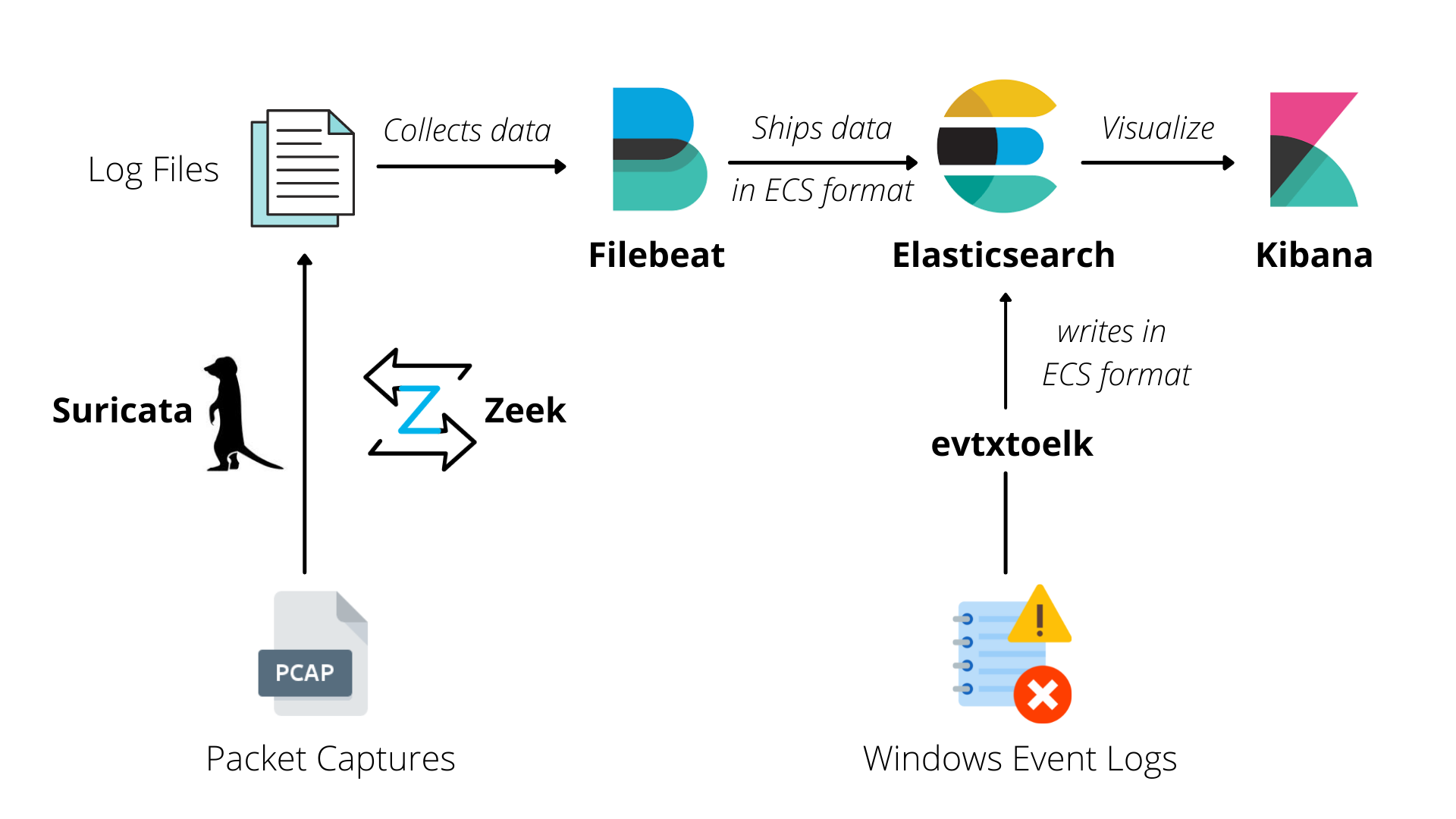
|
|
|
|
|
|
For more information, check PcapMonkey wiki: https://github.com/certego/PcapMonkey/wiki |